Image2Layer
Transform flat images into editable layers effortlessly.
- All time
- — views
- — clicks
- Last 30 days
- — views
- — clicks
Loading activity…
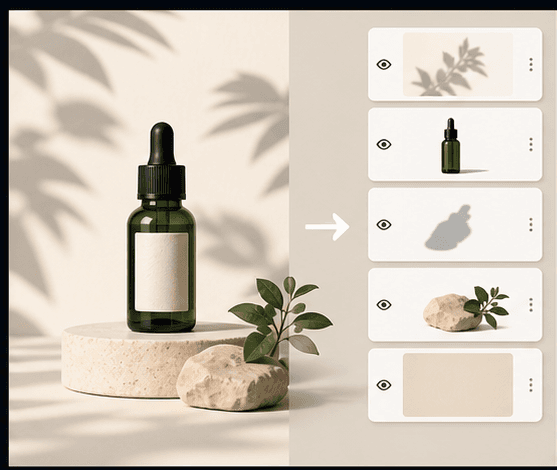
AI image to layers separation
Layered PSD export
Transparent PNG layer export
ZIP package export
Background reconstruction
- Designing graphics for marketing campaigns
- Creating assets for animations or games
- Preparing product images for e-commerce
- Simplifying asset management in content creation
- Generating layered materials for client handoffs
- 1Upload a flat image (JPG, PNG, or WebP) to the platform.
- 2Allow the AI to separate the image into distinct, editable layers.
- 3Export your layers in desired formats: PSD, ZIP package, or transparent PNG.
What does Image2Layer do?
Image2Layer turns a flat JPG, PNG, or WebP image into editable layers.
What kinds of layers can it generate?
It can create subject layers, foreground object layers, shadow layers, text or logo layers, and more.
Which image formats are supported?
You can upload JPG, PNG, and WebP images for processing.
Does Image2Layer reconstruct hidden background areas?
Yes, it can rebuild hidden areas behind separated objects.
Can I export layered PSD files?
Yes, Image2Layer allows exporting of layered PSD files.

Related Tools
More active tools in AI Tools.
Banana AI
Banana AI is a free AI image and video generation platform. Transform photos, create cinematic videos, apply styles, background removal, and restoration—fast and easy.

BG Remove Pro
Remove backgrounds from images instantly with our free AI tool. Get perfect transparent backgrounds in seconds - no signup required. Supports JPG, PNG, WebP formats.

Wan 2.6 AI Video Generator | JXP
DealWan 2.6 generates AI videos from text or images with multi-shot storytelling, reference video control, and native audio sync.

Editimg AI
Transform your images with Editimg AI, the most advanced ai image editor. Edit photos online with AI-powered tools for style transfer, background removal, object replacement, and more.